
Реклама послуг: Як налаштувати ефективну Google Ads кампанію у 2025 році

Введення
Google – це найефективніше джерело клієнтів для реклами послуг. Чому? Тому що люди вже усвідомлюють свою потребу і самі шукають рішення. На відміну від соціальних мереж, де реклама нав'язується користувачеві, Google Ads дозволяє показувати ваші послуги саме тим, хто вже зацікавлений.
Реклама в Google Пошуку миттєво виводить вашу компанію в ТОП пошукової видачі за релевантними запитами, а реклама на YouTube дає можливість наочно демонструвати вашу експертність, якість послуг і переваги перед конкурентами. В результаті ви отримуєте гарячих клієнтів, готових до контакту.
Але успішна реклама послуг – це не тільки грамотне налаштування Google Ads. Це складний процес, у якому важливі три ключові фактори:
- Готовність вашого сайту – наскільки він зручний, зрозумілий і конверсійний.
- Якість налаштування реклами – вибір правильних ключових слів, аудиторії та оголошень.
- Постійний аналіз і оптимізація – без регулярного контролю навіть хороша реклама може "поглинути" бюджет без результату.
У цій статті ми розберемо, як налаштувати рекламу послуг у Google Ads так, щоб вона приносила реальні заявки, і пояснимо, чому професійний підхід до ведення кампаній відіграє вирішальну роль в успіху.
Оптимізація сайту перед запуском реклами
Перед тим як запускати рекламу послуг у Google Ads, важливо переконатися, що ваш сайт готовий до прийому трафіку. Навіть ідеально налаштована кампанія не дасть результатів, якщо потенційний клієнт зайде на незручний або неінформативний сайт.
Основні вимоги до сайту
- Релевантність – сторінка, на яку веде реклама, повинна точно відповідати запиту користувача.
- Швидкість завантаження – сайт повинен завантажуватись швидко, інакше потенційні клієнти підуть до конкурентів.
- Мобільна адаптація – більшість користувачів заходять з телефонів, тому сайт повинен бути зручний на всіх пристроях.
- Простота навігації – клієнт повинен одразу зрозуміти, де знайти потрібну інформацію і як замовити послугу.
Форми захоплення лідів
Клієнту важливо не просто побачити інформацію, а швидко залишити заявку. Для цього на сайті повинні бути:
- Лід-форми – прості форми для збору заявок (ім’я, телефон, e-mail).
- Кнопки зворотного дзвінка – можливість замовити дзвінок в один клік.
- Онлайн-чат – допомагає оперативно відповідати на питання клієнтів.
Унікальна торгова пропозиція (УТП)
Якщо ваш сайт виглядає так само, як у конкурентів, клієнту буде складно зробити вибір. Чітке і зрозуміле УТП допомагає вирізнятися та підвищувати конверсію. Приклади хороших УТП:
- «Ремонт побутової техніки за 24 години з гарантією 1 рік»
- «Юридична консультація за 15 хвилин – безкоштовно»
- «Виїзний автосервіс: приїдемо і полагодимо прямо на місці»
Якщо сайт відповідає цим критеріям, реклама в Google Ads зможе працювати ефективно та приводити заявки з високою конверсією.
Налаштування реклами послуг у Google Ads: покроковий процес
Налаштування реклами в Google Ads вимагає точного підходу. Якщо зробити все правильно, можна отримувати стабільний потік клієнтів. Розберемо процес покроково.
1. Вибір типу рекламної кампанії
Для реклами послуг у Google Ads найкраще підходять:
- Пошукова реклама – оголошення показуються у пошуку Google за цільовими запитами.
- Банерна PMax – банери та текстові оголошення показуються на всіх можливих платформах Google, включаючи пошукову мережу, YouTube, Gmail та партнерські сайти в контекстній мережі.
- YouTube-реклама – відеореклама перед роликами, орієнтована на вашу аудиторію.
2. Подбор ключевых слов
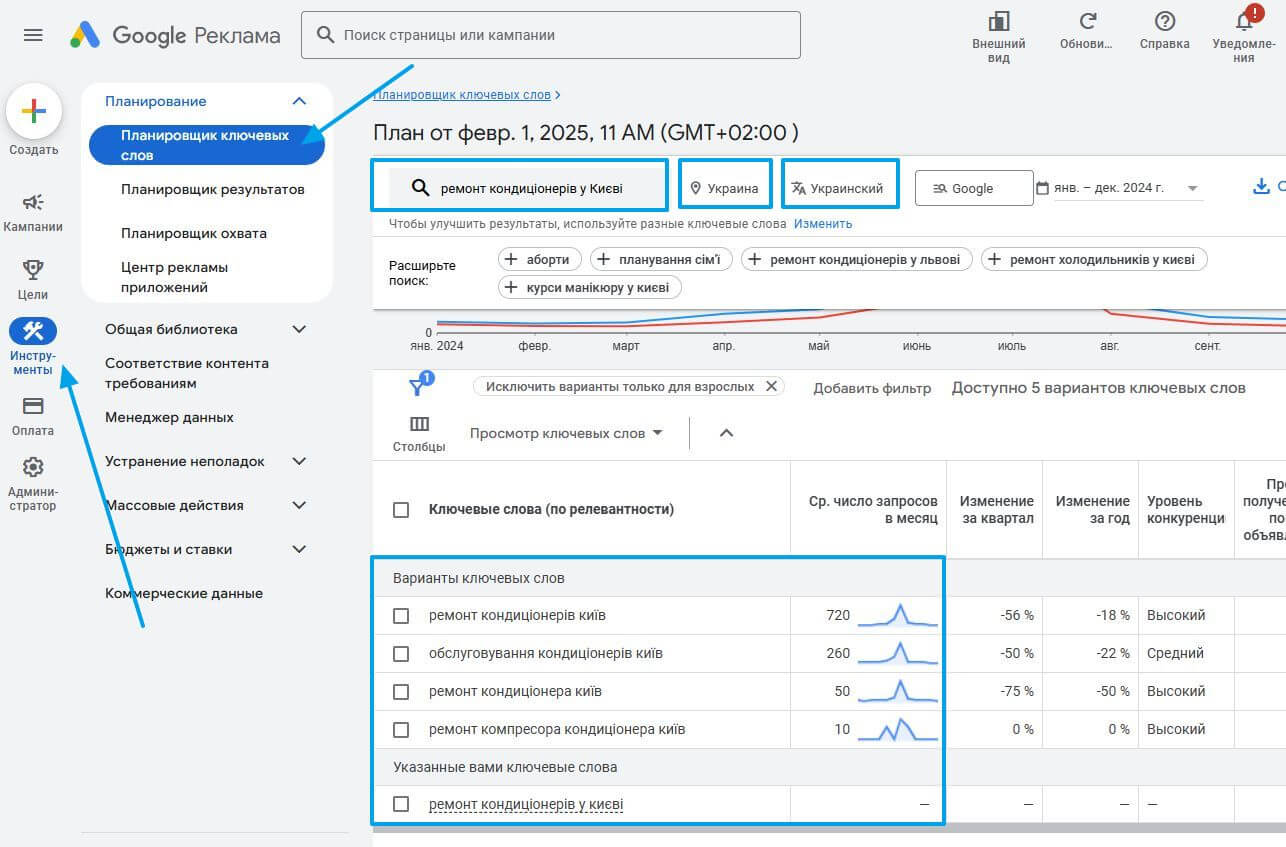
Ключевые слова – основа поисковой рекламы. Их можно подобрать в Google Keyword Planner. Важно:
- Выбирать коммерческие запросы, например: «ремонт кондиционеров в Киеве», а не «как починить кондиционер».
- Использовать средне- и низкочастотные запросы – они дают точный трафик.
- Добавлять минус-слова, чтобы исключить нерелевантные показы. Ищите их среди тех, что показал планировщик, если такие есть.
3. Создание объявлений
Объявления должны быть:
- Привлекательными – включать УТП, выгоды и призыв к действию.
- Точными – соответствовать запросу пользователя.
- Максимально информативными – использовать расширения (адрес, телефон, дополнительные ссылки).
Пример хорошего объявления:
Ремонт Кондиционеров в Киеве ⚡ Выезд за 30 минут ⚡Гарантия 1 год на работы. ⚡Специалисты с опытом от 5 лет чисто, с гарантией сделают ремонт
4. Настройка таргетинга
Для точного попадания в целевую аудиторию важно настроить:
- Геотаргетинг – показывать рекламу только в нужном городе/регионе.
- Временной таргетинг – запускать рекламу в часы, когда клиенты активны.
- Аудитории – сегментировать пользователей по интересам и поведению. Для начала установите просто "Наблюдать", а далее в зависимости от результатов и накопленной статистики, вы сможете использовать эти данные. Если же вы не сделаете этого, то проанализировать в дальнейшем вы не сможете.
5. Бюджет и стратегии ставок
Для начала лучше выбрать стратегию «Максимальное количество кликов», чтобы собрать статистику. Затем можно переключиться на «Целевую цену за конверсию» или «Рентабельность инвестиций в рекламу» (для услуг этот вид редко кто использует, но обязательно протестируйте, и результат может превзайти остальные стратегии. Но работать с ценностью нужно уметь), если накопилось достаточно данных. Достаточными ялляются от 30 конверсий в месяц
6. Запуск и тестирование
После запуска кампании важно:
- Следить за CTR (кликабельностью) объявлений.
- Проверять конверсии и стоимость лида.
- Улучшать объявления.
- Следить за передачей конверсий только тех, по которым ныжно оптимизировать ваши кампании (Основные конверсии)
- Собирать аудитории, с которыми далее можно выстраивать взаимодействия или использовать, как ориентир аудиторий для Google в умных PMax кампаниях
Настройка рекламы – это только начало. Главное – анализировать данные и регулярно вносить изменения, чтобы кампания работала максимально эффективно.
А вот для того, чтобы анализировать данные, важно начать их собирать, и собирать только те аудитории, с которыми можно далее работать.
Пример: Если вы собираете данные только тех кто совершил конверсии за последнии 30 дней, а посетителей у вас до 200 человек в день и % конверсии - 2%, то у вас никогда не накопится статистика для ее использования. Потому что:
30 (дней) * 200 (посетителей) * 0,02 (коеф. конверсии) = 120 человек
а минимальное окличество должно быть 1000!
YouTube для реклами послуг
YouTube – це потужний інструмент, який активно використовується для просування послуг. Відеоконтент допомагає наочно продемонструвати вашу експертність, передати атмосферу бізнесу та показати переваги перед конкурентами. На відміну від текстової реклами, відеоролики привертають увагу і можуть пояснити, чому ваша послуга – це саме те, що потрібно користувачеві.
1. Чому YouTube важливий для реклами послуг?
YouTube дозволяє таргетувати користувачів за інтересами, демографічними даними, а також за діями, які вони виконали на вашому сайті чи в додатку. Це дає вам можливість показувати рекламу тим, хто вже зацікавлений у ваших послугах або схожих пропозиціях. Відео дає можливість:
- Наочно показати процес роботи, деталі продукту або послугу в дії.
- Поділитися відгуками задоволених клієнтів, що сприяє довірі.
- Використовувати відеорекламу для залучення аудиторії, наприклад, через персоналізовані історії.
2. Формати реклами на YouTube
Для реклами послуг на YouTube доступні кілька ефективних форматів:
- Skippable Ads (Пропускаються оголошення) – користувачі можуть пропустити ваше відео через 5 секунд, якщо воно їм не цікаве. Це хороший спосіб привернути увагу на короткий час.
- Non-Skippable Ads (Непропускаються оголошення) – користувачі повинні подивитися відео повністю (зазвичай 15 секунд). Це підходить для важливого повідомлення.
- TrueView Ads (Оголошення з можливістю пропуску) – користувачі можуть пропустити оголошення через 5 секунд, але ви платите тільки за перегляд, якщо користувач подивився відео до кінця.
- Discovery Ads (Оголошення в пошуку та рекомендаціях) – ці оголошення з’являються у вигляді мініатюр у результатах пошуку на YouTube або на головній сторінці.
3. Таргетинг і налаштування
YouTube дозволяє налаштовувати таргетинг за інтересами, демографічними даними та поведінковими факторами. Важливо:
- Підбирати правильну аудиторію – орієнтуйтеся на тих, хто може бути зацікавлений у ваших послугах.
- Використовувати ремаркетинг – показувати рекламу людям, які вже відвідували ваш сайт або взаємодіяли з вашим контентом.
- Географічний таргетинг – таргетувати користувачів у певних регіонах або містах, де знаходяться ваші потенційні клієнти.
4. Переваги реклами на YouTube для послуг
YouTube дає значні переваги для бізнесу:
- Візуальна привабливість – відео допомагає розповісти історію бренду та створити емоційну зв’язок з клієнтом.
- Репутація і довіра – відеоконтент дозволяє продемонструвати експертність, що особливо важливо для послуг, де довіра має вирішальне значення.
- Широкий охоплення – YouTube є однією з найпопулярніших платформ, на якій щодня проводять час мільйони людей.
- Підвищення конверсії – правильне відеооголошення може призвести до великої кількості заявок і контактів.
Отже, реклама послуг на YouTube — це потужний інструмент, який дозволяє не лише привертати увагу, але й вибудовувати довірчі стосунки з потенційними клієнтами.
Аналіз і оптимізація рекламної кампанії
Запуск реклами – це лише перший крок. Щоб реклама послуг приносила стабільні результати, її потрібно регулярно аналізувати і оптимізувати.
1. Моніторинг ключових показників
У Google Ads є безліч метрик, але основні показники, за якими потрібно слідкувати:
- CTR (Click-Through Rate) – показник клікабельності. Високий CTR означає, що оголошення релевантні запитам користувачів.
- CPC (Cost Per Click) – вартість кліка. Потрібно слідкувати, щоб кліки не були занадто дорогими.
- Конверсія – скільки користувачів, які клікнули на рекламу, залишили заявку чи подзвонили.
- CPA (Cost Per Acquisition) – вартість залучення клієнта. Чим нижче, тим краще.
- Якість трафіку – важливо перевіряти, які пошукові запити приводять людей на сайт.
2. Робота з ключовими словами
Після запуску кампанії аналізуємо звіти та:
- Додаємо мінус-слова, щоб виключити нерелевантні покази.
- Видаляємо або коригуємо ключові слова з низьким CTR.
- Додаємо нові ключові слова, якщо бачимо перспективні запити.
3. Оптимізація оголошень
Оголошення мають бути актуальними та ефективними. Регулярно тестуємо:
- Різні варіанти заголовків та описів.
- Призиви до дії (CTA), наприклад: «Замовте консультацію» vs. «Залиште заявку зараз».
- Використання розширень (номери телефонів, адреси, швидкі посилання).
4. Коригування ставок
Аналізуємо, які аудиторії, регіони та пристрої дають найкращий результат, і:
- Підвищуємо ставки для ефективних сегментів.
- Знижуємо ставки для неефективних аудиторій.
- Тестуємо різні стратегії автоматичного призначення ставок.
5. А/Б-тестування
Тестуємо різні елементи кампанії:
- Два варіанти оголошень з різними заголовками.
- Різні сторінки посадки (лендинг з відео vs. лендинг з текстом).
- Зміна аудиторії (наприклад, тестування більш вузького сегмента).
6. Покращення конверсії на сайті
Якщо реклама приводить трафік, але заявок мало, перевіряємо:
- Роботу форм зворотного зв'язку та кнопок.
- Зрозумілість оффера та призивів до дії.
- Наявність швидких способів зв'язку (чат, телефон, WhatsApp).
Якщо конверсій немає зовсім, то перш за все перевірте:
- Чи працюють взагалі конверсії.
- Чи передаються конверсії в рекламний кабінет.
Неможливо описати цю перевірку в рамках даного огляду, але всі спеціалісти знають, як це перевірити. І можуть зробити це за дуже незначну суму. І далі правильно налаштувати спрацьовування.
Регулярний аналіз і оптимізація дозволяють знизити витрати на рекламу та збільшити кількість заявок. Без цих кроків навіть добре налаштована кампанія поступово втратить ефективність.
Чому професійне ведення реклами дає кращі результати
Самостійна настройка реклами – це гарний початок, але для стабільного результату необхідний професійний підхід. Давайте розберемося, чому агентства та спеціалісти з контекстної реклами досягають кращих показників.
1. Глибокий аналіз і стратегія
Експерти не просто запускають рекламу, а проводять:
- Дослідження ринку – аналіз конкурентів, попиту та поведінки користувачів.
- Розробку стратегії – вибір рекламних інструментів, типів кампаній та бюджетів.
- Сегментацію аудиторії – точне таргетування для підвищення конверсії.
2. Досвід в оптимізації
Маркетологи знають, як:
- Правильно підбирати ключові слова та мінус-слова.
- Створювати оголошення, які дають високий CTR і конверсію.
- Налаштовувати ефективні стратегії автоматичного призначення ставок.
- Використовувати просунуті інструменти Google Ads (скрипти, API, автоматизацію).
- Звертати увагу на важливі моменти і як часто можна переглядати, оскільки надмірний моніторинг також шкодить результатам.
Все має бути відповідно до визначених правил!
3. Економія бюджету
Помилки в рекламі можуть дорого коштувати. Професіонали допомагають:
- Уникнути неефективних витрат.
- Оптимізувати вартість кліка та залучення клієнта.
- Своєчасно вимикати нерентабельні оголошення.
4. Доступ до аналітики та тестування
Агентства використовують:
- Професійні інструменти аналітики (Google Analytics 4, Looker Studio).
- A/B-тестування для покращення показників.
- Динамічні оголошення та персоналізовані стратегії.
5. Комплексний маркетинговий підхід
Окрім Google Ads, професіонали інтегрують:
- SEO-просування для органічного зростання.
- Ретаргетинг та ремаркетинг для повернення користувачів.
- Рекламу в YouTube, КМС та Performance Max.
Висновок: самостійна настройка можлива, але без досвіду складно досягти максимального результату. Робота з експертами дозволяє швидше та ефективніше отримувати заявки за найкращою ціною.
Для прикладу ви можете подивитися, які результати дає одне з небагатьох рекламних агентств (читайте розділ кейси) Fedorov Digital на їхньому сайті https://fedorov.kiev.ua/
А при необхідності направити на безкоштовний аудит (на момент написання статті) за посиланням: https://fedorov.kiev.ua/services/bezkoshtovna-otsinka/ свій рекламний кабінет і дізнатися, що можна покращити в працюючих кампаніях
Часто задавані питання (FAQ)
Як налаштувати Google Ads для реклами послуг?
Для успішної настройки реклами послуг у Google Ads потрібно виконати кілька кроків: створити акаунт, вибрати тип кампанії, налаштувати таргетинг і вибрати ключові слова, які відповідають запитам вашої цільової аудиторії. Для кращого результату важливо враховувати специфіку вашого сайту та послуг.
Які ключові слова вибрати для реклами послуг?
Ключові слова повинні відображати потреби вашої цільової аудиторії. Для реклами послуг вибирайте запити, які максимально точно описують ваш продукт або послугу, а також слова з низькою конкуренцією, щоб знизити вартість кліка. Використовуйте мінус-слова, щоб виключити нецільові запити.
Що важливо на сайті перед запуском реклами?
Перед запуском реклами важливо переконатися, що ваш сайт оптимізований для конверсій: він повинен бути зручним, мобільним, швидко завантажуватися і мати ясні заклики до дії (форми захоплення, кнопки тощо). Також важливо наявність унікальних торгових пропозицій (УТП), які будуть переконливо показувати переваги вашої пропозиції.
Як виміряти ефективність реклами в Google Ads?
Для оцінки ефективності реклами в Google Ads важливо відслідковувати такі метрики, як CTR (клікабельність), конверсії, вартість конверсії, а також ROI (окупність інвестицій). Використовуйте Google Analytics і Looker Studio для більш детального аналізу.
Чи потрібно використовувати YouTube для реклами послуг?
YouTube — це відмінний канал для реклами послуг, особливо якщо ваш бізнес передбачає візуальну демонстрацію продуктів або процесів. Відео допомагає створити емоційну зв'язок з потенційними клієнтами та переконати їх у вашій експертності.
Що таке ремаркетинг і як він допомагає в рекламі послуг?
Ремаркетинг — це інструмент, який дозволяє показувати рекламу користувачам, які вже відвідали ваш сайт або взаємодіяли з вашим контентом. Це збільшує шанс на конверсію, оскільки користувачі вже знайомі з вашим брендом і послугами.
Залишити коментар